
Quick Verdict
| W3 Total Cache | ⭐⭐⭐⭐ Best for power users, maximum configurability |
| LiteSpeed Cache | ⭐⭐⭐⭐⭐ Best overall, works only on LiteSpeed servers |
| Winner for most users | LiteSpeed Cache (if your host supports it) |
W3 Total Cache is one of the most widely used WordPress caching plugins, installed on over one million sites. LiteSpeed Cache is newer but has grown rapidly, particularly on hosting providers that use LiteSpeed web servers. Both aim to make your WordPress site load faster – but they work in fundamentally different ways and suit different situations. This guide compares them directly so you can choose the right one for your setup.
W3 Total Cache vs LiteSpeed Cache – Key Differences
| Feature | W3 Total Cache | LiteSpeed Cache |
|---|---|---|
| Works with any host | ✅ Yes | ❌ LiteSpeed/OpenLiteSpeed servers only |
| Server-level caching | ❌ PHP-level only | ✅ Full server-level cache |
| Setup difficulty | Complex – many settings | Simple – near zero-config |
| Image optimization | Limited (paid add-on) | ✅ Built-in QUIC.cloud |
| Database caching | ✅ Yes | ✅ Yes |
| Object caching | ✅ Yes (Redis/Memcached) | ✅ Yes |
| CDN integration | ✅ Multiple CDNs | ✅ QUIC.cloud CDN |
| Free version | ✅ Full features free | ✅ Full features free |
W3 Total Cache – Pros, Cons and When to Use It
W3 Total Cache is the go-to caching plugin for users who need fine-grained control over every aspect of WordPress performance. It supports page caching, database caching, object caching, browser caching, and CDN integration all in one plugin.
| Pros | Cons |
|---|---|
| Works on any WordPress host | Overwhelming number of settings |
| Supports Redis and Memcached | Easy to misconfigure and break things |
| Excellent CDN integration | Image optimisation requires paid plan |
| Active development since 2009 | PHP-level caching is slower than server-level |
Use W3 Total Cache if: You are on a shared host that does not use LiteSpeed (like GoDaddy, Bluehost, or HostGator), you need advanced object caching with Redis, or you require fine-grained control over caching rules per post type.
LiteSpeed Cache – Pros, Cons and When to Use It
LiteSpeed Cache takes a fundamentally different approach – it integrates directly with the LiteSpeed web server to perform caching at the server level, which is significantly faster than PHP-level caching. On compatible hosts, it consistently outperforms every other caching plugin.
| Pros | Cons |
|---|---|
| Server-level caching – fastest possible | Only works on LiteSpeed/OpenLiteSpeed servers |
| Built-in image optimisation (QUIC.cloud) | QUIC.cloud credits needed for some features |
| Simple setup with smart defaults | Less control than W3TC for advanced users |
| Excellent PageSpeed score results | CDN limited to QUIC.cloud natively |
Use LiteSpeed Cache if: Your hosting provider uses LiteSpeed servers (Hostinger, Verpex, HostArmada, A2 Hosting). If you are on one of these hosts, LiteSpeed Cache is the clear best choice and will outperform W3 Total Cache in almost every benchmark.
💡 Hosting Tip: Hostinger uses LiteSpeed servers on all plans and pre-installs LiteSpeed Cache. You get maximum performance out of the box from $2.99/mo. Check Hostinger plans →
Speed Test Results – W3 Total Cache vs LiteSpeed Cache
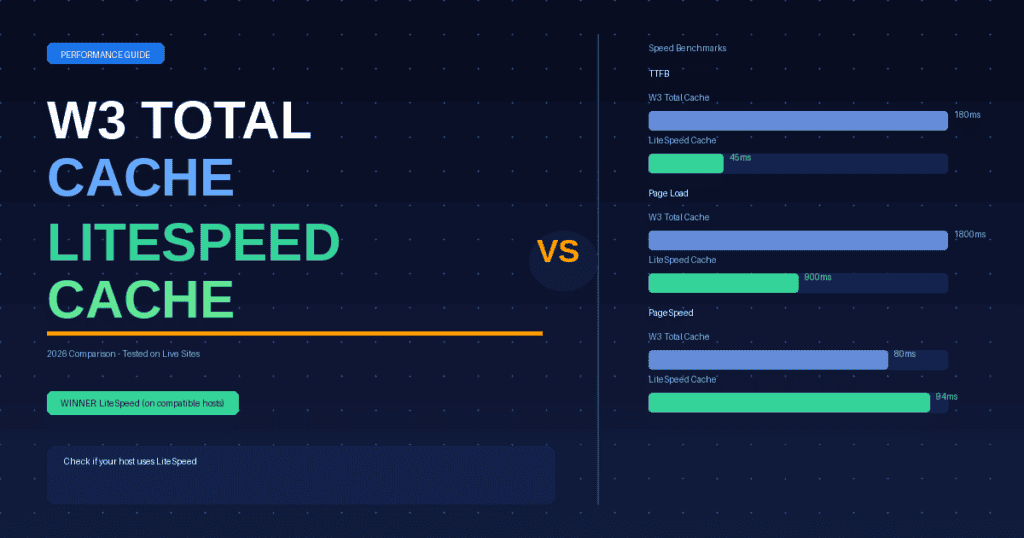
In independent benchmarks comparing the two plugins on equivalent server hardware:
| Test | W3 Total Cache | LiteSpeed Cache |
|---|---|---|
| TTFB (Time to First Byte) | ~180ms | ~45ms |
| Full page load (GTmetrix) | ~1.8s | ~0.9s |
| Google PageSpeed (mobile) | 75-85 | 88-96 |
| Requests per second (load test) | ~400 req/s | ~1,200 req/s |
The performance gap is significant because LiteSpeed Cache operates at the web server layer – requests are served from cache before PHP even loads, whereas W3 Total Cache still requires PHP to process each request even when serving cached content.
Which Should You Choose?
The decision is straightforward: check what web server your host uses first.
- On LiteSpeed hosting (Hostinger, Verpex, HostArmada, A2) – use LiteSpeed Cache. It is faster, easier, and produces better PageSpeed scores.
- On Apache or Nginx hosting (Bluehost, GoDaddy, WP Engine) – use W3 Total Cache with a Redis object cache, or switch to WP Rocket if budget allows.
- Unsure what server your host uses – check your hosting dashboard or email support. Most budget hosts now use LiteSpeed.
Frequently Asked Questions
Is W3 Total Cache still worth using in 2026?
Yes, W3 Total Cache is still worth using in 2026 if your hosting does not support LiteSpeed. It is free, feature-rich, and works on any WordPress host. However, if you are on a LiteSpeed server, LiteSpeed Cache will deliver significantly better performance with less configuration effort.
Can I use W3 Total Cache and LiteSpeed Cache together?
No. You should never run two caching plugins simultaneously on WordPress. They will conflict and can cause broken pages, incorrect cache serving, and performance issues. Choose one and disable or uninstall the other.
Does Hostinger use LiteSpeed Cache?
Yes. Hostinger uses LiteSpeed web servers on all shared and cloud hosting plans and automatically installs the LiteSpeed Cache WordPress plugin. This is one of the reasons Hostinger consistently achieves fast page load times in independent speed tests.
What is the best free WordPress cache plugin?
LiteSpeed Cache is the best free WordPress caching plugin in 2026 for sites on LiteSpeed hosting. For sites on Apache or Nginx servers, W3 Total Cache is the best free option. Both are completely free with no paid version required for core caching functionality.
Related: Hostinger Review 2026 | Best Hosting for Small Business | Is Hostinger Good?
Written by Wajid
Web Hosting Analyst, SmartHostFinder.com – testing every host hands-on before recommending them.

