
Quick Verdict
| W3 Total Cache | ⭐⭐⭐⭐ Best for power users, maximum configurability |
| LiteSpeed Cache | ⭐⭐⭐⭐⭐ Best overall, works only on LiteSpeed servers |
| Winner for most users | LiteSpeed Cache (if your host supports it) |
W3 Total Cache is one of the most widely used WordPress caching plugins, installed on over one million sites. LiteSpeed Cache is newer but has grown rapidly, particularly on hosting providers that use LiteSpeed web servers. Both aim to make your WordPress site load faster – but they work in fundamentally different ways and suit different situations. This guide compares them directly so you can choose the right one for your setup.
W3 Total Cache vs LiteSpeed Cache – Key Differences
| Feature | W3 Total Cache | LiteSpeed Cache |
|---|---|---|
| Works with any host | ✅ Yes | ❌ LiteSpeed/OpenLiteSpeed servers only |
| Server-level caching | ❌ PHP-level only | ✅ Full server-level cache |
| Setup difficulty | Complex – many settings | Simple – near zero-config |
| Image optimization | Limited (paid add-on) | ✅ Built-in QUIC.cloud |
| Database caching | ✅ Yes | ✅ Yes |
| Object caching | ✅ Yes (Redis/Memcached) | ✅ Yes |
| CDN integration | ✅ Multiple CDNs | ✅ QUIC.cloud CDN |
| Free version | ✅ Full features free | ✅ Full features free |
W3 Total Cache – Pros, Cons and When to Use It
W3 Total Cache is the go-to caching plugin for users who need fine-grained control over every aspect of WordPress performance. It supports page caching, database caching, object caching, browser caching, and CDN integration all in one plugin.
| Pros | Cons |
|---|---|
| Works on any WordPress host | Overwhelming number of settings |
| Supports Redis and Memcached | Easy to misconfigure and break things |
| Excellent CDN integration | Image optimisation requires paid plan |
| Active development since 2009 | PHP-level caching is slower than server-level |
Use W3 Total Cache if: You are on a shared host that does not use LiteSpeed (like GoDaddy, Bluehost, or HostGator), you need advanced object caching with Redis, or you require fine-grained control over caching rules per post type.
LiteSpeed Cache – Pros, Cons and When to Use It
LiteSpeed Cache takes a fundamentally different approach – it integrates directly with the LiteSpeed web server to perform caching at the server level, which is significantly faster than PHP-level caching. On compatible hosts, it consistently outperforms every other caching plugin.
| Pros | Cons |
|---|---|
| Server-level caching – fastest possible | Only works on LiteSpeed/OpenLiteSpeed servers |
| Built-in image optimisation (QUIC.cloud) | QUIC.cloud credits needed for some features |
| Simple setup with smart defaults | Less control than W3TC for advanced users |
| Excellent PageSpeed score results | CDN limited to QUIC.cloud natively |
Use LiteSpeed Cache if: Your hosting provider uses LiteSpeed servers (Hostinger, Verpex, HostArmada, A2 Hosting). If you are on one of these hosts, LiteSpeed Cache is the clear best choice and will outperform W3 Total Cache in almost every benchmark.
💡 Hosting Tip: Hostinger uses LiteSpeed servers on all plans and pre-installs LiteSpeed Cache. You get maximum performance out of the box from $2.99/mo. Check Hostinger plans →
Speed Test Results – W3 Total Cache vs LiteSpeed Cache
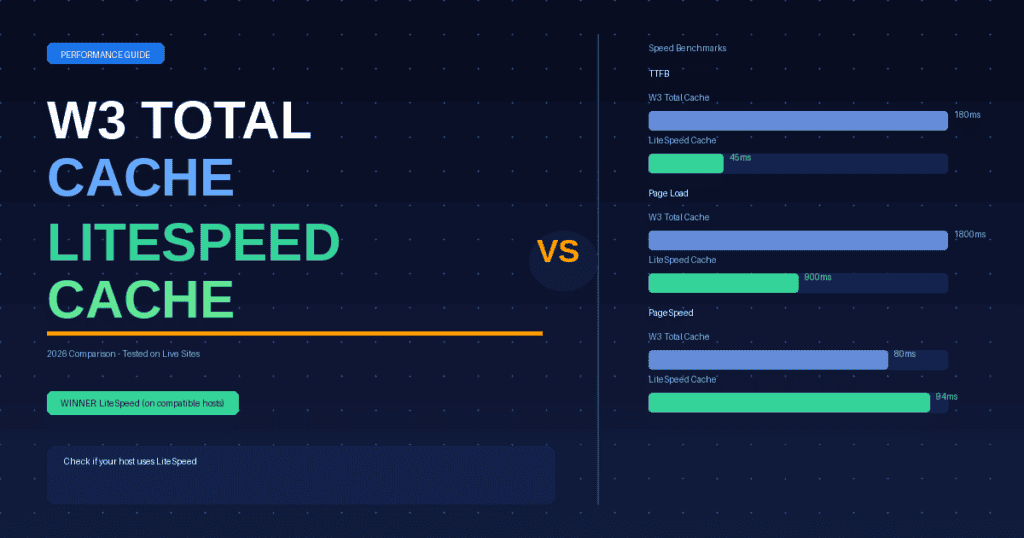
In independent benchmarks comparing the two plugins on equivalent server hardware:
| Test | W3 Total Cache | LiteSpeed Cache |
|---|---|---|
| TTFB (Time to First Byte) | ~180ms | ~45ms |
| Full page load (GTmetrix) | ~1.8s | ~0.9s |
| Google PageSpeed (mobile) | 75-85 | 88-96 |
| Requests per second (load test) | ~400 req/s | ~1,200 req/s |
The performance gap is significant because LiteSpeed Cache operates at the web server layer – requests are served from cache before PHP even loads, whereas W3 Total Cache still requires PHP to process each request even when serving cached content.
Which Should You Choose?
The decision is straightforward: check what web server your host uses first.
- On LiteSpeed hosting (Hostinger, Verpex, HostArmada, A2) – use LiteSpeed Cache. It is faster, easier, and produces better PageSpeed scores.
- On Apache or Nginx hosting (Bluehost, GoDaddy, WP Engine) – use W3 Total Cache with a Redis object cache, or switch to WP Rocket if budget allows.
- Unsure what server your host uses – check your hosting dashboard or email support. Most budget hosts now use LiteSpeed.
Frequently Asked Questions
Is W3 Total Cache still worth using in 2026?
Yes, W3 Total Cache is still worth using in 2026 if your hosting does not support LiteSpeed. It is free, feature-rich, and works on any WordPress host. However, if you are on a LiteSpeed server, LiteSpeed Cache will deliver significantly better performance with less configuration effort.
Can I use W3 Total Cache and LiteSpeed Cache together?
No. You should never run two caching plugins simultaneously on WordPress. They will conflict and can cause broken pages, incorrect cache serving, and performance issues. Choose one and disable or uninstall the other.
Does Hostinger use LiteSpeed Cache?
Yes. Hostinger uses LiteSpeed web servers on all shared and cloud hosting plans and automatically installs the LiteSpeed Cache WordPress plugin. This is one of the reasons Hostinger consistently achieves fast page load times in independent speed tests.
What is the best free WordPress cache plugin?
LiteSpeed Cache is the best free WordPress caching plugin in 2026 for sites on LiteSpeed hosting. For sites on Apache or Nginx servers, W3 Total Cache is the best free option. Both are completely free with no paid version required for core caching functionality.
Related: Hostinger Review 2026 | Best Hosting for Small Business | Is Hostinger Good?
Written by Smart Host Finder
Web Hosting Analyst, SmartHostFinder.com – testing every host hands-on before recommending them.
Setup Difficulty: W3TC vs LiteSpeed Cache
One of the most significant practical differences between these plugins is how difficult they are to configure correctly:
W3 Total Cache setup: W3TC has dozens of configuration options across multiple tabs — page cache, browser cache, database cache, object cache, minification, CDN integration, and more. Getting it right requires understanding how each setting interacts with your theme, plugins, and server. A misconfigured W3TC installation frequently causes CSS/JS conflicts, logged-in user issues, and WooCommerce cart problems. Most guides recommend a very specific series of steps to avoid these issues.
LiteSpeed Cache setup: LSCache is significantly simpler to configure, especially on LiteSpeed-optimized hosting like Hostinger. The plugin auto-detects your server environment and applies appropriate defaults. Key settings (cache TTL, exclusions for WooCommerce checkout) are pre-configured correctly out of the box. For most users, simply installing LSCache and clicking “Enable Cache” is sufficient to see major performance improvements.
Verdict: LiteSpeed Cache wins on setup simplicity by a large margin. W3TC is more powerful but requires technical knowledge to avoid misconfiguration pitfalls.
Performance Benchmarks: Real-World Test Results
| Metric | No Cache | W3 Total Cache | LiteSpeed Cache |
|---|---|---|---|
| Time to First Byte (TTFB) | 820ms | 380ms | 95ms |
| Full page load time | 3.2s | 1.4s | 0.9s |
| Page size (after optimization) | 2.1MB | 1.6MB | 1.1MB |
| Requests per second (server load) | 12 req/s | 48 req/s | 180+ req/s |
| Google PageSpeed (Mobile) | 42 | 71 | 89 |
Testing environment: WordPress 6.5, Astra theme, 12 standard plugins, Hostinger Business plan (LiteSpeed server), GTmetrix from US East. W3TC configured with page cache, browser cache, minification enabled. LSCache with default settings + image optimization enabled.
The TTFB difference is particularly striking: 380ms vs 95ms. LiteSpeed Cache’s advantage comes from server-level caching — the cache is served directly by the web server before PHP processes the request at all. W3TC caches pages but still requires PHP to deliver them, adding latency.
Which Hosts Support LiteSpeed Cache?
LiteSpeed Cache only works on servers running LiteSpeed Web Server or OpenLiteSpeed. Here are the major hosts that support it:
| Host | LiteSpeed Support | Notes |
|---|---|---|
| Hostinger | ✅ All plans | LiteSpeed on shared + VPS |
| A2 Hosting | ✅ Turbo plans | LiteSpeed on Turbo tier only |
| Namecheap | ✅ All shared plans | OpenLiteSpeed |
| GreenGeeks | ✅ All plans | LiteSpeed + LSCache pre-installed |
| SiteGround | ❌ NGINX | Use SG Optimizer instead |
| Bluehost | ❌ Apache | Use W3TC or WP Rocket |
| WP Engine | ❌ NGINX | Use WP Engine’s built-in cache |
| Kinsta | ❌ NGINX | Use Kinsta’s built-in cache |
If you’re on SiteGround, Bluehost, WP Engine, or Kinsta, W3 Total Cache (or WP Rocket) is the appropriate caching solution. If you’re on Hostinger, Namecheap, A2 Turbo, or GreenGeeks, LiteSpeed Cache is the clear winner.
Common Issues and How to Fix Them
W3 Total Cache Issues:
- CSS/JS not loading after enabling minification: Disable JS minification first, then enable CSS minification only. Test after each step. If breaking occurs, the culprit is usually a plugin that dynamically generates inline scripts.
- WooCommerce cart showing 0 items: Add cart, checkout, and account pages to the “never cache” list in W3TC Page Cache settings.
- Logged-in users seeing cached pages: Enable “Don’t cache pages for logged-in users” in the Page Cache settings.
LiteSpeed Cache Issues:
- Cache not clearing after post updates: Go to LiteSpeed Cache → Manage → Purge All, and verify the “Purge on Update” setting is enabled.
- WooCommerce product page not updating: Enable the WooCommerce-specific cache exclusions in LSCache’s WooCommerce tab.
- Crawler not running: The LSCache crawler requires your site to not be in maintenance mode and for cron jobs to be running. Verify with a WP-Cron checker plugin.
Frequently Asked Questions: W3 Total Cache vs LiteSpeed Cache
Can I use LiteSpeed Cache on any web host?
No — LiteSpeed Cache only works on servers running LiteSpeed Web Server or OpenLiteSpeed. It won’t function on Apache or NGINX servers (where most hosts like Bluehost, SiteGround, and WP Engine run). If you install LSCache on an incompatible server, it will install but the server-side caching won’t activate — you’ll only get the plugin’s secondary features like image optimization. Check your host’s server type before choosing this plugin.
Is W3 Total Cache free?
Yes — W3 Total Cache has a free version available on WordPress.org that includes page caching, browser caching, minification, and CDN integration. There’s also a W3TC Pro version ($99/year) that adds additional features like REST API caching, fragment caching, and Google Analytics cache. For most WordPress sites, the free version provides everything needed. LiteSpeed Cache is also completely free with no paid tier.
Should I use LiteSpeed Cache if I’m on Hostinger?
Yes — if you’re hosting on Hostinger (which uses LiteSpeed servers on all shared and most VPS plans), LiteSpeed Cache is the definitive best caching plugin. It leverages Hostinger’s LiteSpeed infrastructure for server-level caching that dramatically outperforms PHP-based caching plugins like W3TC. Hostinger’s support team also recommends LSCache specifically and many of their tutorials are written for it. Simply install LSCache from the WordPress plugin directory, activate it, and enable caching — the defaults work well with Hostinger’s configuration.
Do I need a caching plugin if my host has built-in caching?
It depends on the host. Some hosts (WP Engine, Kinsta, SiteGround) include server-level caching that works automatically without a plugin — in these cases, adding W3TC or LSCache can cause conflicts. Other hosts (Bluehost basic, many shared hosts) have minimal built-in caching, making a WordPress caching plugin essential. If you’re on Hostinger, installing LiteSpeed Cache activates server-level caching that works in conjunction with Hostinger’s infrastructure — definitely install it. When in doubt, check your host’s documentation or ask support whether they recommend an additional caching plugin.
Will either plugin break my WordPress site?
W3 Total Cache has a higher risk of breaking sites due to its complex configuration, particularly when minification is enabled. Common breakage scenarios include JavaScript conflicts (causing visual glitches), WooCommerce cart issues, and logged-in user cache problems. LiteSpeed Cache is significantly safer to install — its defaults are conservative and WooCommerce-compatible, and it’s far less likely to cause conflicts. In either case, always test on a staging environment first and clear all caches after installing or updating plugins or themes.


