
Choosing between Hostinger and Bluehost is one of the most common dilemmas for new website owners. Both offer affordable plans, WordPress integration, and millions of active users. However, they differ significantly in pricing, performance, and the overall experience they deliver.
We tested both hosts side-by-side for over 60 days. Here is exactly what we found.
Head-to-Head Comparison
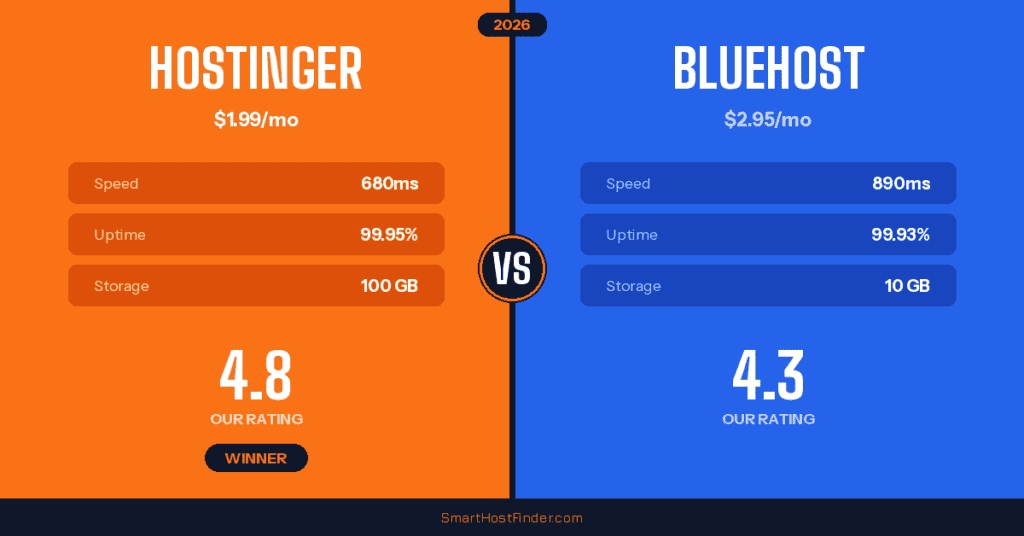
| Feature | Hostinger | Bluehost |
|---|---|---|
| Starting Price | $1.99/mo CHEAPER | $2.95/mo |
| Storage | 100 GB SSD | 10 GB SSD |
| Free Domain | Yes | Yes |
| Free SSL | Yes | Yes |
| Avg Load Time | 680ms FASTER | 890ms |
| Uptime | 99.95% | 99.93% |
| Control Panel | hPanel (custom) | cPanel-based |
| Money-Back | 30 days | 30 days |
| Phone Support | No | Yes ADVANTAGE |
| WordPress.org Rec | No | Yes ADVANTAGE |
Pricing Breakdown
Hostinger wins the pricing battle convincingly. Their Premium shared hosting plan starts at $1.99/month — nearly a dollar less than Bluehost’s Basic plan at $2.95/month. The gap widens when you compare what you get: Hostinger includes 100 GB of storage versus Bluehost’s 10 GB on the entry plan.
Renewal pricing is important to consider as well. Hostinger renews at around $7.99/month while Bluehost renews at approximately $11.99/month. Both increase after the introductory period, but Hostinger remains the more affordable option long-term.
Performance Test Results
We set up identical WordPress sites on both platforms and monitored them for 60 days. Hostinger delivered an average server response time of 680ms compared to Bluehost’s 890ms. This 24% speed advantage is noticeable, especially for content-heavy sites.
Uptime was comparable, with Hostinger at 99.95% and Bluehost at 99.93%. Both are solid, but Hostinger had fewer brief outages during our testing period. Additionally, Hostinger uses LiteSpeed servers on higher plans, which gives a significant performance boost for WordPress sites.
Features Compared
Hostinger Advantages
Hostinger offers more storage (100 GB vs 10 GB), faster load times, AI-powered website builder tools, and a more modern control panel. Their hPanel is custom-built and feels faster than traditional cPanel. You also get access to multiple data center locations worldwide.
Bluehost Advantages
Bluehost shines with its official WordPress.org recommendation, 24/7 phone support (Hostinger only offers chat), and deeper WordPress integration. Their onboarding experience for WordPress beginners is slightly smoother, with a guided setup wizard that walks you through every step.
Hostinger Pros & Cons
4.8 / 5
Visit HostingerBluehost Pros & Cons
4.3 / 5
Visit BluehostCustomer Support
Bluehost has the edge in customer support. They offer 24/7 phone support in addition to live chat and email. In our tests, phone wait times averaged 8 minutes, and agents were knowledgeable about WordPress-specific issues.
Hostinger relies on live chat and email support. Chat response times averaged 3-5 minutes during business hours but could stretch to 15+ minutes during peak times. The quality of their chat support was generally good, with agents providing clear and helpful guidance.
Who Should Choose Which?
Choose Hostinger if: You want the best value for money, need more storage, prioritize speed, or are comfortable with chat-based support. It is ideal for budget-conscious users building personal blogs, portfolios, or small business sites.
Choose Bluehost if: You want an officially recommended WordPress host, prefer having phone support available, or are a complete beginner who wants the smoothest possible WordPress setup experience.
The Winner: Hostinger
While both are solid hosts, Hostinger wins our head-to-head comparison thanks to its lower pricing, faster performance, and significantly more generous storage allocation. Bluehost remains a strong choice for those who value phone support and the WordPress.org stamp of approval.
Get Hostinger — $1.99/mo Get Bluehost — $2.95/moWant to see how we evaluate hosting providers? Read our complete testing methodology. You can also check out our full best WordPress hosting comparison for more options.

